
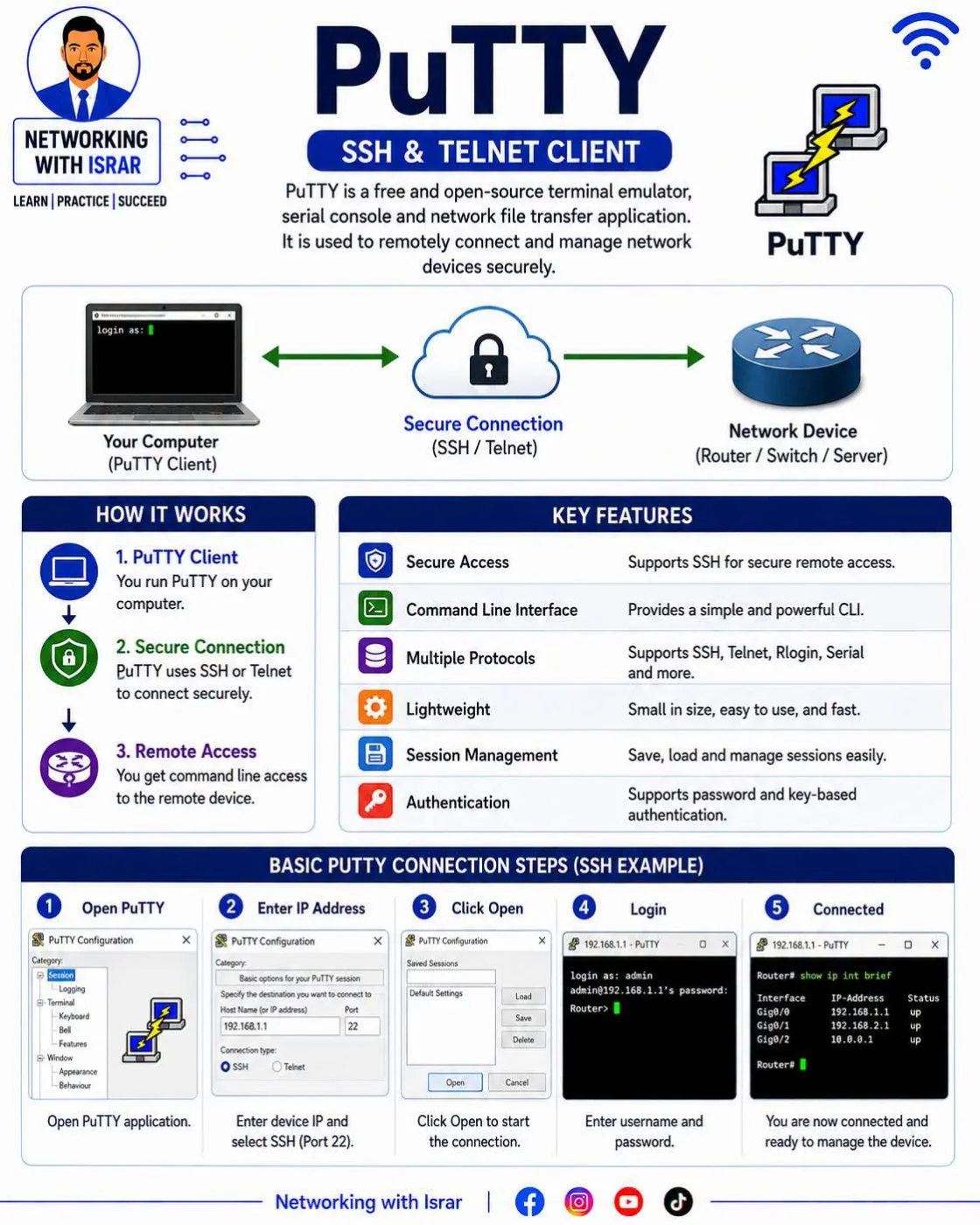
PuTTY — Remote Access Tool Every Network Engineer Should Know! PuTTY is one of the most popular tools used by CCNA students, Network Engineers, and System Administrators to remotely access and manage routers, switches, servers, and other network devices. ✅ Connect to network devices using SSH ✅ Supports Telnet, Serial, Rlogin & more ✅ SSH provides secure encrypted remote access ✅ Lightweight, fast, and easy to use ✅ Save and manage connection sessions ✅ Supports password and key-based authentication Best Practice: Always prefer SSH over Telnet when possible because SSH encrypts your communication. 🎯 Quick Challenge: Which port is used by SSH by default? A️⃣ Port 21 B️⃣ Port 22 C️⃣ Port 23 D️⃣ Port 80 👇 Drop your answer in the comments — no Googling! 📌 Save this PuTTY guide for your CCNA practice. 🔄 Share it with your networking friends. 🚀 Follow Networking with Israr for daily CCNA, CCNP, Cisco Labs, Routing, Switching & Network Security content. #NetworkingWithIsrar #CCNA #PuTTY #SSH #Networking #NetworkEngineer
Comments 0
Log in to leave a comment.